
In class, we had a guest speaker, Victoria Woelders, introduce us to ARC-BC. The ARC-BC presentations introduced me to the importance of designing educational materials that are accessible and inclusive for all students. One of the things that stood out to me most was the demonstration on Canva and the different accessibility features it offers. Before this presentation, I had not necessarily considered how some of the smaller design choices we make when creating educational materials can affect a student’s ability to access information. For example, I learned that even something as simple as including icons on a virtual poster can create an accessibility barrier for students who use read-aloud technology. Through Canva, there are options to either have these icons ignored by the read-aloud feature or have them described so that students understand what they represent. This was something I had never really thought about before, but it made me realize how important it is to consider different accessibility needs when creating classroom resources.
Another aspect of the presentation that stood out to me was learning about the different elements of digital accessibility, including font choices, text size, colour contrast, alternative text, descriptive hyperlinks, and reading order. These are all things that I may have previously overlooked when creating assignments, presentations, or classroom resources. I found it interesting to learn that accessibility extends beyond simply making information available digitally. The way information is organized, presented, and interpreted can determine whether students are able to access it independently.
As a future elementary school teacher, these presentations encouraged me to be more intentional about the resources I create and use in my classroom. Rather than assuming that all students will interact with a worksheet, presentation, or digital resource in the same way, I need to consider the different barriers students might experience. I also found the discussion surrounding the Accessible British Columbia Act important because it emphasized identifying, reducing, and preventing accessibility barriers. I think this is something teachers should consider during the planning process rather than waiting until a student experiences difficulties.
However, one concern I had throughout the presentations was the cost associated with some of the tools and resources demonstrated. Although these programs offer valuable accessibility features, many require paid subscriptions or access to premium versions. As a current university student preparing to become a teacher, I recognize that having access to these resources is not always realistic, particularly for teachers working within limited classroom budgets. This raises an important question about how educators can create inclusive learning environments when some of the tools designed to support accessibility come with additional costs. I think it is important to recognize that designing for inclusion should not depend on how much money a teacher or school can spend on technology. Educators need access to practical, affordable resources that allow them to meet the diverse needs of their students.
Overall, these presentations changed the way I think about accessibility when creating educational materials. I learned that even small details, such as the use of icons, font choices, and the organization of information, can make a difference in whether a student can independently access learning materials. Moving forward, I want to be more conscious of these considerations and explore accessible and affordable ways to create classroom resources. Ultimately, creating an inclusive classroom means recognizing that students experience and access information differently and making an effort to ensure that everyone has an opportunity to participate and learn.
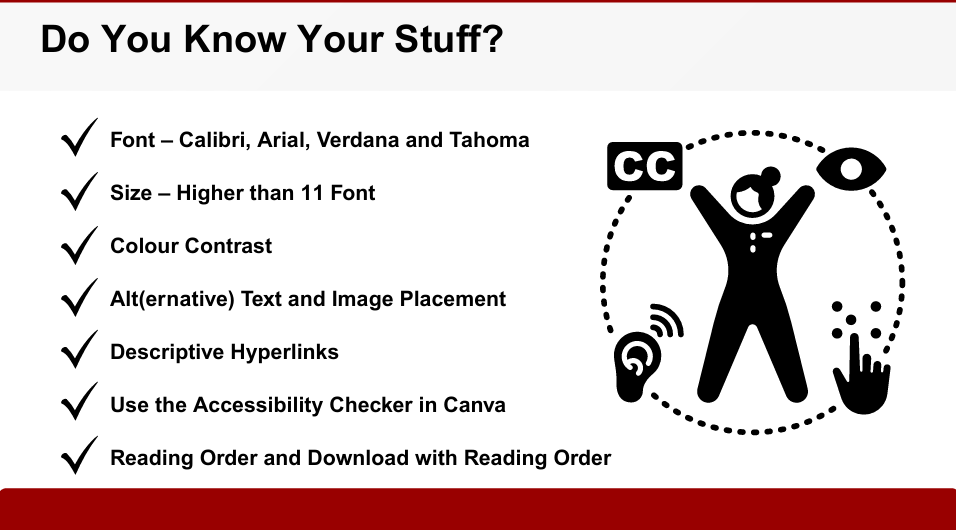
(Screenshot taken from Victoria Woelders’ presentation on Designing for Inclusion)
Leave a Reply